
How to Create Sub-Accounts Under my Account

  • Log in to Core
Billing Login


  • Navigate to Contacts/Sub-Accounts under Account
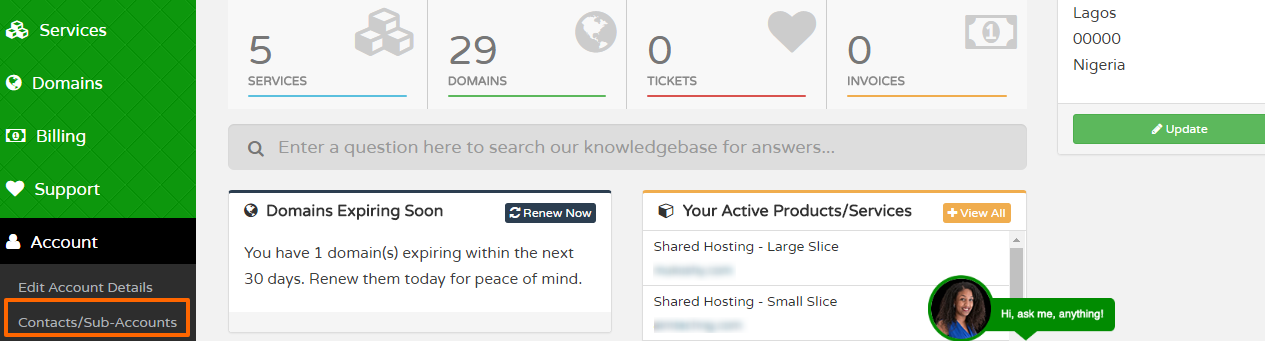
Sub Accounts

  • Add a new contact
  • To allow this contact access to this account on our platform, just tick the Sub-Account checkbox.
  • Next enter a password and then tick the various options that you want to grant the sub-account permission to access.
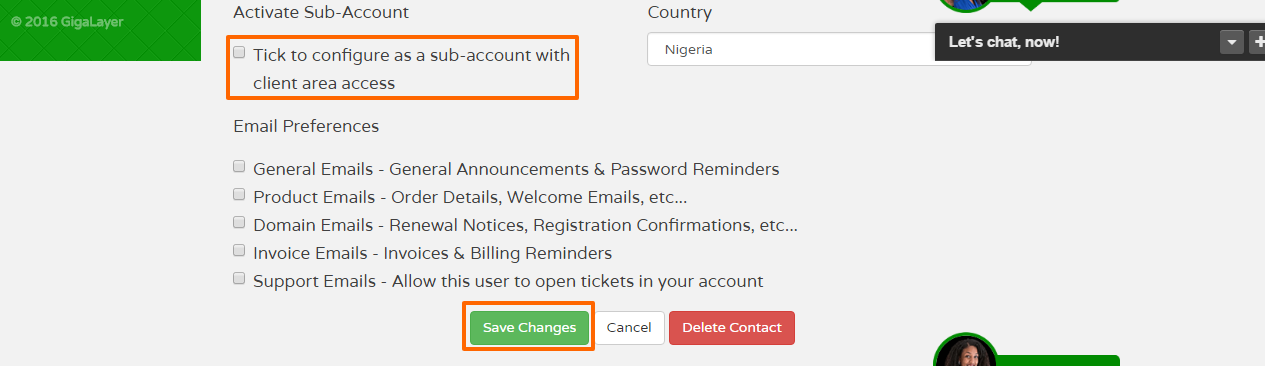
Activate Sub Account

Once done, hit save and the new account holder is ready to log in. You can provide him/her the log in details.

  • 3 Users Found This Useful
Was this answer helpful?

Related Articles

How to Enable Mod_Rewrite Module

In order to enable Mod_Rewrite for your site you should create a text file called .htacccess in...

Folder and File Permissions

For the security of your websites, these should be your default permission settings:...

How to Enable PHP Error Reporting

If your application/script is not working as expected and you're not sure why, a great way to...

How to use ClamAV Virus Scanner

To run a virus scan, follow these steps: Log in to cPanel On the Advanced tab of the...

How to Resolve "cPanel Error: Your IP has Changed".

cPanel will sometimes throw out the error "IP address has changed!" while you're trying to...